

Blackmagic Design has officially released DaVinci Resolve 20, and it’s packed with over 100 new features, many of which are designed to make life easier for editors through the power of AI-automation. Whether you’re working solo on YouTube content or deep in post for a narrative film, the new updates are aimed at speeding up workflows while still keeping things creative.
Why AI Editing Tools Matter
Let’s be real editing can get repetitive. Finding the right clips, syncing them to a script, adjusting subtitles, switching angles it all adds up. That’s why Resolve 20’s AI-powered tools feel like a big step forward. They’re not here to replace editors but to help take care of the tedious parts so you can focus more on storytelling and timing.

Key Features in DaVinci Resolve 20:
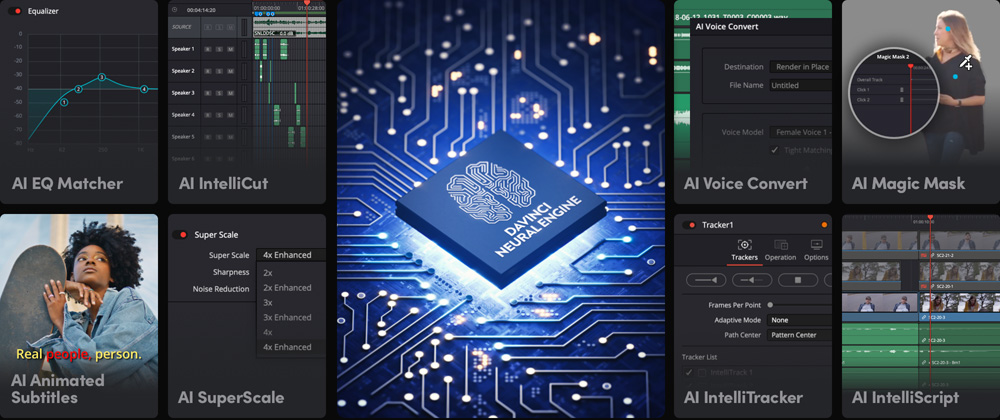
- ✅ AI IntelliScript – Generate a rough cut automatically from a written script. Perfect for doc or interview editing.
- ✅ AI Animated Subtitles – Dynamic captions that move in sync with the voice. Less work, better results.
- ✅ Multicam SmartSwitch – Automatically selects the right angle in multicam edits based on who’s talking.
- ✅ Improved Keyframe Editor – Smoother animation and motion controls in the edit and Fusion tabs.
- ✅ Updated Magic Mask & Depth Map – More accurate subject isolation and background effects, especially handy for color grading and compositing.
- ✅ New Voice Over Tool – A cleaner way to record and punch in VO takes right inside the timeline.
How It Impacts Creators
For indie filmmakers, content creators, and even fast-paced commercial editors, DaVinci Resolve 20 makes everyday edits faster without sacrificing control. The AI assists, but you’re still the one making the creative calls. If you’re trying to turn around edits quicker or just reduce the manual workload this update could be worth a test run.
